
Schedule generator
You don't have to start from an empty week.
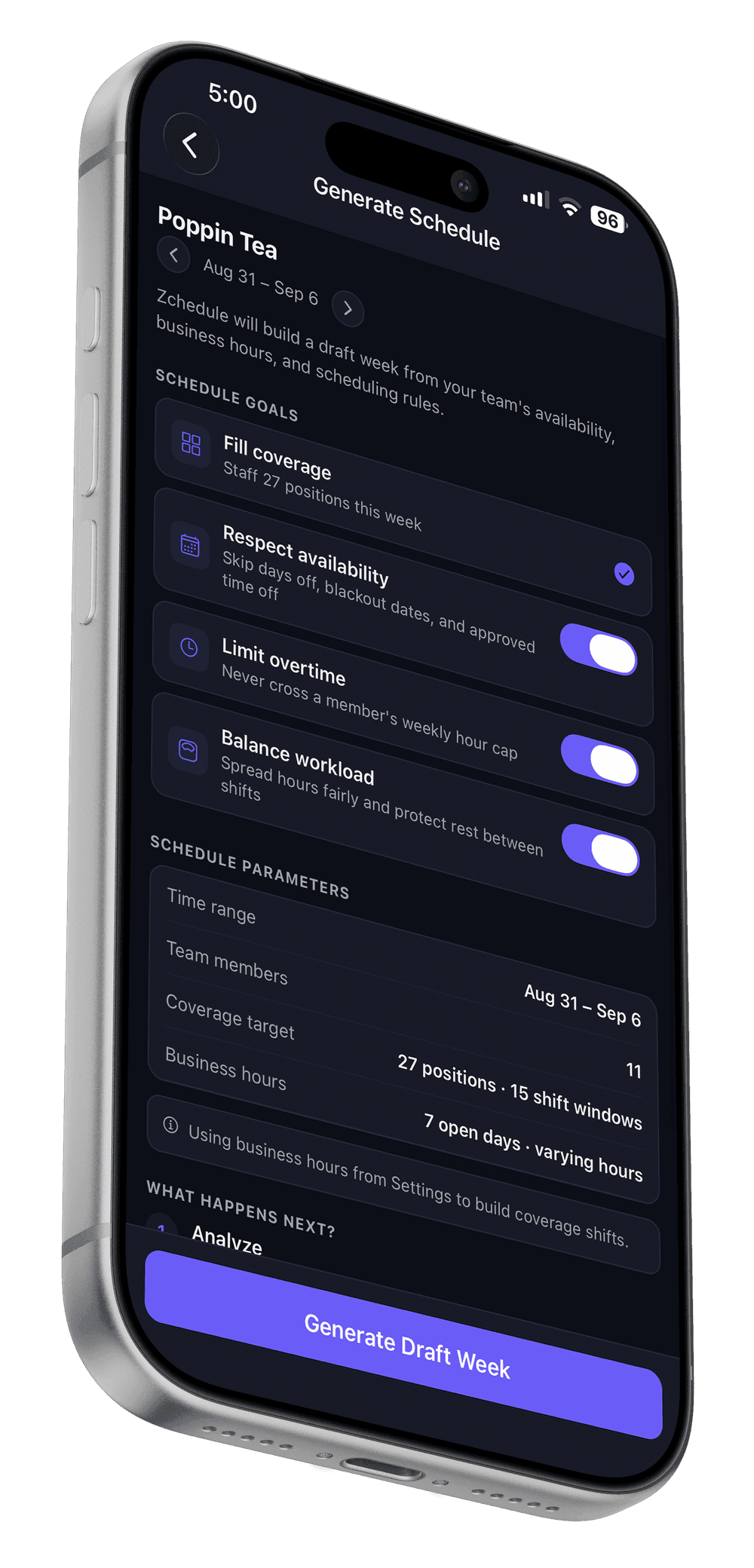
Tell Zchedule when you're open and how many people you need on. It drafts the week around everyone's availability and hours, explains each placement, and waits for you to publish.
Zchedule's schedule generator is a rules-based scheduler for hourly teams: it fills each required position from the eligible people, scores candidates on hours, role, rest and history, records the reason for every choice, and writes the result as drafts that employees can't see until published.
The generator is on Pro. Every new team gets 14 days of Pro, starting with the first shift you create.
Updated
Four modes
Four ways to draft a week, depending on what you already have.
- Build Full Week
- Starts from your opening hours and how many people you need on per role, and fills all seven days. Use it when the week is empty. Two ways to describe staffing: an automatic plan from your business hours, or a guided plan where you name each slot.
- Fill Empty Shifts
- Leaves everything you've already placed alone and assigns people to the shifts with nobody on them. Use it when you've laid out the week by hand and have gaps.
- Rebalance Hours
- Moves generated draft shifts off people who are above about 85% of their weekly cap and onto people below about 55%. It never touches a shift you placed by hand or one that is already published.
- Reuse Best Week
- Takes a past week that worked and refits it to this week's availability. Use it when your weeks look alike and you'd rather adjust than rebuild.
What it reads
The inputs behind every placement.
- Business hours and staffing
- When you're open each day and how many people you need on per role — the positions the generator has to fill.
- Availability
- Each person's weekly hours and days off, specific blocked dates, and approved time off. Set by the employee in the app.
- Roles
- Each person's position, compared with the role a shift needs. Some positions can cover others; a requirement can also demand an exact match.
- Existing shifts
- Drafts and published shifts already on the week. Nobody is double-booked, and a window you staffed by hand isn't staffed again.
- Hours and caps
- Hours already scheduled this week against the person's cap — 40 by default, or the cap you set for them.
- History
- The last 8 weeks of published shifts, to learn who usually works which day and role. A new team simply has no history yet.
Rules and preferences
Some things it will never do. Everything else is a score.
Three switches decide the rules; within them, every candidate for a shift gets a score and the best one is placed.
Hard rules — a candidate is simply ineligible
- Already has a shift that overlaps this one. Always.
- The shift requires an exact role and theirs doesn't fit. Always.
- Unavailable — a day off, outside their hours, a blocked date or approved time off — when Respect availability is on. On by default.
- The shift would take them past their weekly cap when Limit overtime is on. On by default.
After the run, a separate validator re-checks every hard rule against the finished list. If it ever finds a breach, it is reported to you as a diagnostic, never hidden.
Preferences — they change the score, not eligibility
- Fair spread of hours, role fit, rest since yesterday, history, consecutive days, employment type — the factors in the table below, when Balance workload is on.
- Penalties for a pending time-off request, a split shift, and (with Limit overtime off) crossing the cap.
- Shifts are filled tightest-first: the position with the fewest eligible people is decided before the ones with plenty.
- Three improvement passes afterwards try moving assignments to fill gaps and even out hours, keeping a move only if the whole week gets better.
None of this is a guarantee of a perfect week. It is a consistent, explainable way to get to a good draft in seconds instead of forty minutes.
How candidates are scored
The factors, and how much each one counts.
Each factor is scored from 0 to 1 and the weighted sum, minus any penalties, is the candidate's score. These are the values in the engine today; they may be tuned over time, and the date below says when this table was last checked against the code.
| Factor | Relative weight | What it measures |
|---|---|---|
| Room left this week | 35% | How far the person is from their weekly hour cap. The further, the better the candidate — this is what spreads hours fairly. |
| Role match | 25% | How well the person's position fits the role the shift needs. |
| Rest since yesterday | 12% | Hours between yesterday's end and this shift's start, against a 10-hour target. |
| Continuity | 12% | Whether this person usually works this day and role, from the last 8 weeks. Neutral for a new team. |
| Consecutive days | 11% | Pressure against long runs: mild from 2 days, stronger from 3, strongest from 5. |
| Employment type | 5% | Full-time first, then part-time, seasonal and temporary, on-call last. |
| Penalty: Would cross the weekly cap | −45% | Only applies when Limit overtime is off; with it on, this is a hard rule instead. |
| Penalty: Pending time off on that date | −25% | A request you haven't approved yet. Approved time off is a hard rule. |
| Penalty: Split shift | −20% | The person already has a separate, non-touching shift that day. |
Updated
Implementation snapshot, read from the engine's own weights file.
Hours and rest
Weekly caps, rest between shifts, and long runs.
- Weekly cap
- 40 hours by default. You can set a different cap per person in their team settings, and the generator uses that instead. With Limit overtime on, it is never crossed.
- Rest between shifts
- A target of 10 hours between one day's last end and the next day's first start. It's a preference, not a rule: a short turnaround scores worse, it isn't forbidden.
- Consecutive days
- Also a preference. Pressure starts at 2 days in a row, rises at 3, and is strongest at 5 and beyond.
Generate, review, publish
Every shift says why. Nothing goes out until you say so.
Step 1
Generate
Pick a mode, check the three switches, run it. A 12-person week takes seconds.
Step 2
Review
Every generated shift is a draft with a reason on it — for example “Best match for Line Cook · Has room this week”. Open the ones you want to check; the publish check reminds you about any you haven't.
Step 3
Edit
Drag, reassign or delete anything. Hand-placed shifts are yours; Rebalance never moves them.
Step 4
Publish
Press Publish, read the check, and the week reaches your team's phones. Until then they see the last published version, not the draft.
Worked example
A 12-person café runs Build Full Week.
- 1.The manager sets business hours (6:00–19:00) and staffing: 2 Baristas on the opening slot, 1 Barista and 1 Shift Lead on the closing slot, seven days. That's 28 positions to fill.
- 2.Twelve people, all with availability set. Priya has blocked out Saturday for a wedding; Dev has approved time off Wednesday and Thursday. With Respect availability on, neither can be placed on those days — not scored lower, simply not eligible.
- 3.Marcus already has 34 hours on the week from shifts placed by hand. With Limit overtime on and a 40-hour cap, an 8-hour closing shift would put him at 42, so he is ineligible for it; a 6-hour opener is fine.
- 4.Positions are filled tightest-first. Sunday's Shift Lead slot has two eligible people; it's decided before Tuesday's opener, which has nine.
- 5.For each position the eligible people are scored. Ana, who has 12 hours so far and usually opens Fridays, wins Friday's opener over Tom, who is at 30 hours — room left this week counts for 35%, and her history counts for 12%.
- 6.Three improvement passes look for moves that fill any remaining gap or even out hours without breaking a rule.
Result: 28 draft shifts, each with a reason (“Regular Friday Barista · Has room this week”), a diagnostics list of anything it couldn't fill and why, and nothing visible to the twelve employees until the manager publishes.
Names and times are illustrative; the rules are the product's.
Plans
Which plan you need.
Which plan
- Schedule generator, all four modes
- Pro — $39.99/month per team
- Publish check with a 0–100 score
- Free
- Availability and blocked-out dates
- Free
The board, the publish check and availability are on every plan; the generator is what Pro adds to them.
FAQ
Questions worth answering up front.
Pro, $39.99 a month per team for unlimited people. Every new team gets 14 days of Pro-level access starting with its first shift, so you can generate real weeks before deciding.
Yes, as a hard rule when the Respect availability switch is on (it is on by default). Approved time off, blocked dates, days off and hours outside someone's availability make them ineligible for that shift. A time-off request you haven't approved yet doesn't block them; it counts against them.
Yes, as a hard rule when Limit overtime is on: it never places a shift that would take someone past their weekly cap. The cap is 40 hours unless you set a different one for that person. With the switch off, crossing the cap is allowed but heavily penalised.
No. Everything the generator creates is a draft. Employees only ever see published shifts, so nothing reaches their phones until you review the week and press Publish. The publish check also deducts points for generated shifts you haven't opened yet.
Yes. Every generated shift carries a reason — “Best match for Barista · Has room this week”, “Regular Friday shift · Kept hours balanced” — shown on the shift in the dashboard.
The app can generate a draft week with the same engine and the same result for the same inputs. The four modes with all their options are on the web dashboard.
It leaves the position open and tells you why — everyone eligible was on approved leave, or over their hours — in the diagnostics after the run. It never invents a person or breaks a hard rule to fill a gap.
Related
- Pricing
Pro is one flat price per team, unlimited people.
- Coffee shops
Availability-first scheduling for students, second jobs and openers.
- Restaurants
Front of house and the line on one board, with call-outs covered.
- Coverage and swaps
What happens to a generated week once it's published and life intervenes.
- The publish check
The seven things Zchedule checks before your team sees a week, and how the score works.
Generate a real week, then decide.
14 days of Pro on every new team, starting with your first shift. No card.