
About
Zchedule is scheduling software for small hourly teams, made by Lazy Leaf LLC.
Managers build the week on the web. Employees see their shifts on their phone. The time clock, coverage requests and the schedule generator sit around that one loop, and the price is one flat amount per team.
Zchedule is employee scheduling and time-clock software for hourly teams of up to about a hundred people — restaurants, cafés, retail, salons, cleaning crews and similar. It is a web app for managers and an iPhone app for everyone, published by Lazy Leaf LLC, a California limited liability company. Free for up to 10 people; Starter and Pro are $19.99 and $39.99 a month per team.
Updated
The company
Who makes it.
- Company
- Zchedule is a product of Lazy Leaf LLC, a California limited liability company. Lazy Leaf LLC is the party named in the terms of service and the privacy policy.
- Where
- California, United States. Zchedule is built for and sold to teams in the US; prices are in US dollars.
- Contact
- support@zchedule.app for support, product questions and business enquiries. Details on the contact page.
- The iPhone app
- Zchedule for iPhone is on the App Store.
The product
What it does, in one screen each.
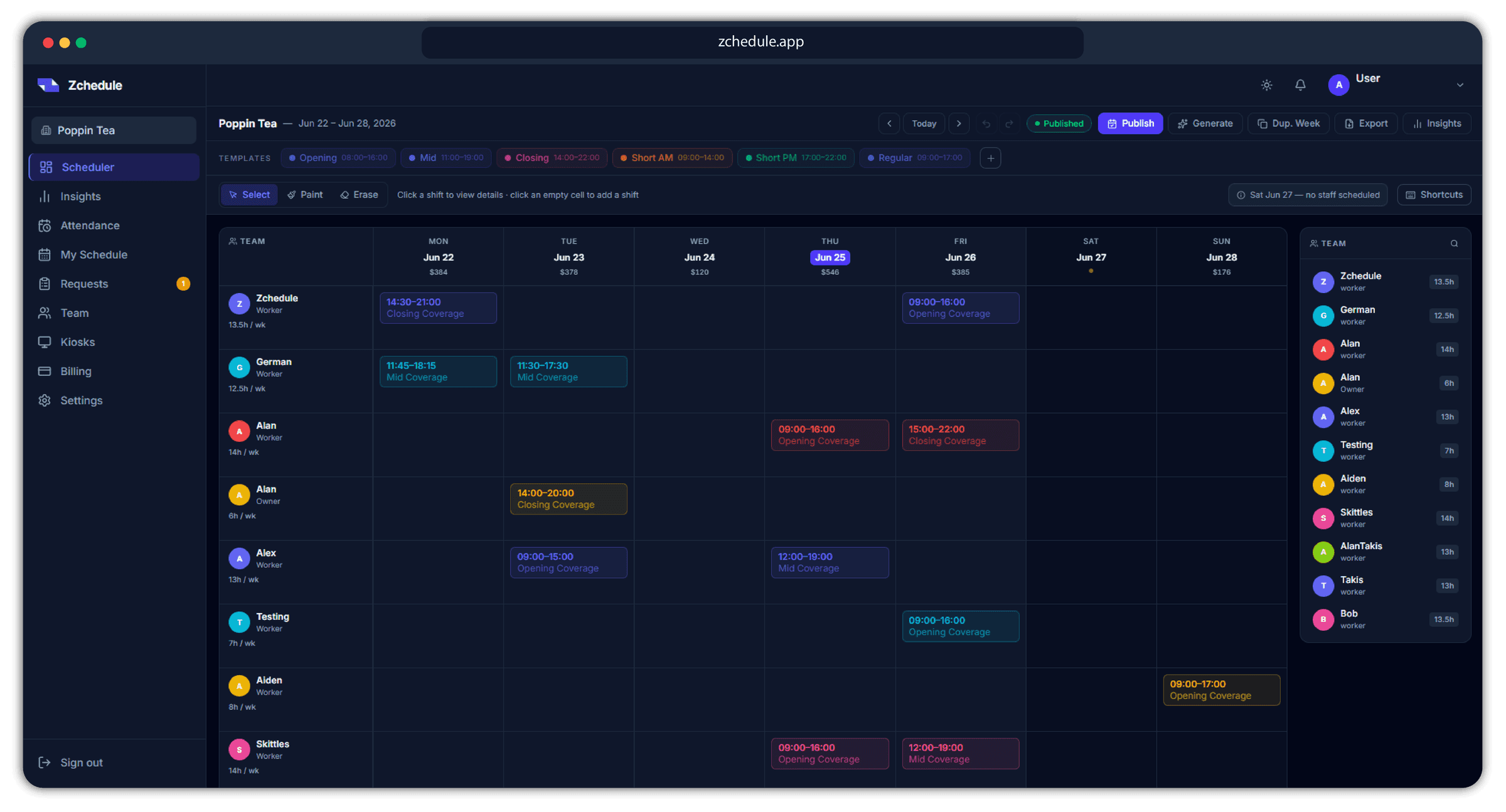
- The weekly board
- Every person on a row, their shifts across the week, weekly hours and the labor cost of each day. Managers build it on the web.
- The publish check
- Before a week goes out, Zchedule lists overtime, availability conflicts, overlaps, unassigned shifts and empty days, and scores the week out of 100.
- Drafts stay private
- Employees only ever see published shifts. A half-finished week never reaches their phones.
- The employee's screen
- Their next shift, the rest of the week, their availability, and the requests they've raised. That's the whole app for most people.
- Coverage and swaps
- A call-out becomes a posted shift that coworkers volunteer for; a trade becomes one approval with both people's hours shown.
- Time clock
- Punches from the phone, a browser or a shared tablet, matched to the schedule, checked against a GPS zone if you set one, exported as a payroll-ready CSV.
- Schedule generator
- Drafts the week from your hours, staffing and everyone's availability, with the reason for every placement, as drafts you review before publishing.
- One price per team
- Free for up to 10 people, Starter for up to 30, Pro for unlimited. Adding people never changes the bill. Every new team gets 14 days of Pro.
Where it runs
A web dashboard, an iPhone app, and any browser.
- Managers
- The web dashboard at www.zchedule.app is where the full board, the generator and the reports live. The iPhone app carries manager screens too — approvals, attendance, kiosks, clock-in zones and a draft-week generator.
- Employees
- The iPhone app, or the web on any phone. Employees on Android use the web app in their browser; there is no Android app.
- Shared tablets
- Kiosk mode runs on an iPad or on any tablet with a browser, for teams that clock in with a PIN at the counter.
On purpose
What Zchedule doesn't do.
Most scheduling tools grow a hiring pipeline, a document library and a payroll run around a job that takes forty minutes a week. Zchedule keeps the job at forty minutes. Today it does not provide:
Payroll processing
It exports hours as a CSV. It does not pay anyone and does not sync with payroll providers.
HR records
No employee files, documents, reviews or onboarding paperwork.
Hiring
No job posts, applicant tracking or interviews.
Point-of-sale integration
No POS connection. Labor cost is calculated from scheduled hours and the pay rates you enter.
An Android app (Coming soon)
Android users use the web app in their browser.
Client booking
Zchedule schedules staff, not appointments. It is not a booking system for customers.
Read next
- Pricing
All three plans, what a team of 6, 15, 25 or 40 pays, and the plan FAQ.
- How it works
The four-step weekly loop: build, check, publish, adapt.
- Contact
Support, product and business questions.
Try it on next week's schedule.
Free for up to 10 people, no card, and 14 days of Pro to see the rest.